
Sponsored:
Sponsored 2:
||||||||||||||||||||||||||||||||||||||||||||||||||||||||||||||||||||||||||||||||||||||||||||||||||||||||||||||||||||||||||||||||||||||||||||||||||||||||||||||||||||||||||||||||||||||||||||||||||||||||||||||||||||||||||||||||||||||||||||||||||||||||||||||||||||||
[ES]
[ES]
Contexto:
Por si no lo conocen, Canon Creative Park es un sitio de internet de Canon donde se ofrecen actividades imprimibles como tarjetas, decoraciones y sobre todo Modelos de papel.
Estos modelos son de muy buena calidad e incluyen instrucciones claras e ilustrativas con cada uno.
Desde que inició el sitio todas las actividades y modelos habían sido de libre acceso y se podían descargar directamente a cualquier computadora. Lamentablemente desde hace un tiempo Canon ha eliminado modelos de su página (aunque siguen agregando modelos nuevos constantemente) y ha estado cerrando el acceso a estos archivos: subiendo primero modelos nuevos disponibles solo con una cuenta de Canon ID, hasta septiembre del año pasado, para cuando decidieron conceder el acceso solamente a través del programa Canon Print, que requiere una impresora Canon para funcionar.
Apenas se dio el cambio los usuarios aprendieron a acceder a los archivos modificando los enlaces con el identificador del proyecto. Esto fue parchado por Canon apenas un mes después.
Recientemente un usuario de Reddit ha logrado volver a acceder a los archivos con una linea de código, aparte conseguí la versión antigua del sitio almacenada en la Way Back Machine, donde se pueden descargar muchos modelos interesantes que han sido borrados desde entonces.

Método 1 - Modelos Antiguos:
El más sencillo,: hay que entrar a la página de Canon a través de la Way Back Machine, el enlace a insertar es http: //c p.c-ij. com/en/contents/1006/ (borrar los espacios) y buscar una captura de fechas entre finales de 2014 y principios de 2015, porque esto es poco antes de que el sitio se actualizara. Si se intenta con una fecha posterior o con el enlace de la página actual de Creative Park, la página no será navegable dentro de la Way Back Machine.
Pero con el enlace dado, y e la fecha indicada, se podrá navegar el sitio y descargar directamente los PDF, esto incluye muchos modelos que Canon a borrado de su sitio desde entonces, por ejemplo este Cubo Soma cuadriculado que ya no se encuentra en el Creative Park.
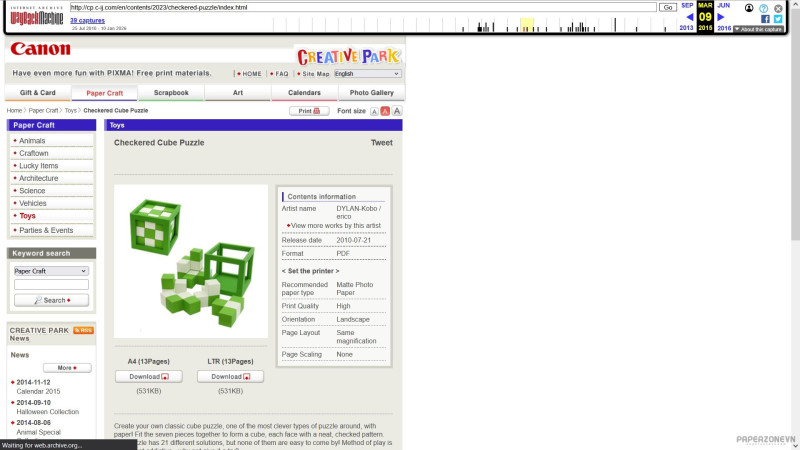
Esta forma de navegar el sitio es lenta, no recomiendo abrir más de dos pestañas con el sitio.
Método 2 - Modelos Modernos (Subidos Post-2015):
Doy crédito de este método a los usuarios de Reddit Cheddar_triffel, que creó el método apenas Canon limitó el acceso a su contenido, y a Nayeet, que Corrigió la línea de código una vez Canon parchó su sitio :3 Este es el hilo de Reddit original
Para este método vamos a crear un marcador falso, para lo cual crearemos un marcador (la estrella para sitios favoritos en el navegador, o bookmark en inglés), lo editaremos con un nombre cualquiera (como por ejemplo «Descargar») y en lugar del enlace pondremos esta línea de código (el emoticón se copia como dos puntos y paréntesis, por favor ignorarlo):
javascript
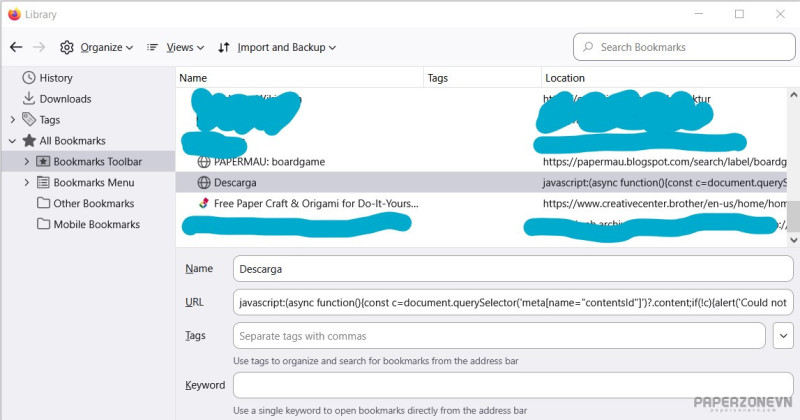
Este va a ser nuestro botón de descarga. Para ejecutarlo simplemente navegaremos por la página oficial del Creative Park, entraremos en la página de un módelo que nos guste y haremos clic al marcador, ¡este correrá la linea de código que buscará el archivo PDF y lo descargará a la computadora!
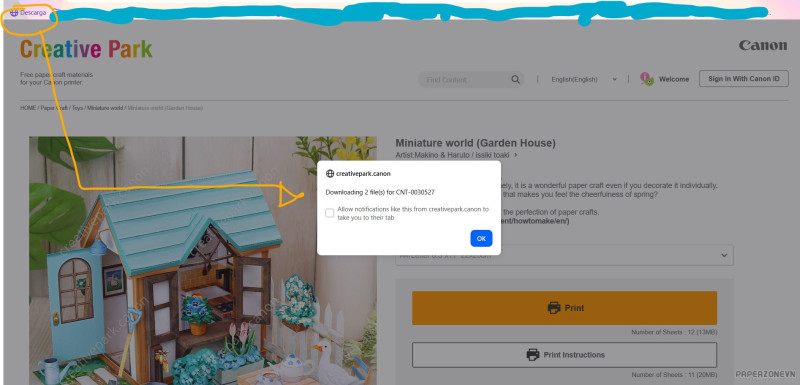
Así ya van a poder descargar cualquier modelo del sitio. Espero esta información sea tan útil para ustedes como lo es para mí. Si tienen un usuario de Reddit no olviden pasarse por el hilo para agradecer a Cheddar_triffel y a Nayeet uwu
||||||||||||||||||||||||||||||||||||||||||||||||||||||||||||||||||||||||||||||||||||||||||||||||||||||||||||||||||||||||||||||||||||||||||||||||||||||||||||||||||||||||||||||||||||||||||||||||||||||||||||||||||||||||||||||||||||||||||||||||||||||||||||||||||||||
[EO]
Kunteksto:
Se vi ne konas ĝin, Kanon-Kriejtiv-Parko estas retpaĝo de Kanon-o, kie oni donis multe da preseblajn okupojn, kiel kartojn, alglualbumarojn kaj ĉefe Papermodelojn
Ĉi modeloj estas tre bonkvalitaj kaj enhavas klarajn kaj ilustrantajn instruojn.
De la kreado de la paĝo ĉiu okupo kaj modelo estis libere atingebla kaj oni povis elŝuti ilin direkte al iu ajn komputilon. Bedaŭrinde de iom da tempo ĝis nun Kanon-o eliminis modelojn de la retpaĝo (sed ili aldonas novajn modelojn) kaj eklimigis la atingebleco de la dosieroj: unue ili aldonis novajn modelojn nur por Kanon-ID akontoj, kaj en septembro de la lasta jaro ili ekdonis la kapablo de presi la dosierojn nur per la programo Kanon-Print, kiu bezonas Kanon-prezejo por funkcii.
Apenaŭ kiam la paĝo ŝanĝiĝis, uzantoj lernis kiel trovi la PDF dosierojn per reeskribi la ligilojn kun la numero de identigo de la projektoj. Tio estis fliketa de Kanon nur post unu monato.
Sed nune uzanto de Reddito povis reatingi la dosieroj per kodo, mi ankaŭ povis trovi malnovajn versio de la paĝo en la Ŭejbak-Maŝino, kie oni povas elŝuti multe da modelojn, kiu estis eliminitaj de tiam.
Unua Metodo - Malnovaj Modeloj:
La plaj facila: oni devas eniri al la Kreativ-Parkon per la Ŭej Bak Maŝino, la enmetota ligilo estas http: //c p.c-ij. com/en/contents/1006/ (foririgu la spaciojn) kaj serĉi foton inter la datoj decembro 2014 kaj januaro 2015, tial ke ĉi estis la datoj malposte a la aktualigado de la paĝo. Se oni provas per posta dato aŭ per la aktuala ligilo de Kreativ-Parkon, la paĝo estos nenavigebla en la Ŭejbak-Maŝino.
Sed kun la donita ligilo, kaj en tiuj datoj oni povos navigi la retpaĝon kaj direkte elŝuti la PDF-ojn, inklude multe da modelojn kiu Kanon-o eliminis de la paĝo, ekzemple ĉi tiu kubo de Soma, kiu ne plu estas en la Kriejtiv-Parko:
Ĉi manjiero de navigi estas tre malrapida, mi ne rekomendas malfermi pli da du langetojn samtempe.
Dua Metodo - Novaj Modeloj (Post-2015):
Mi akreditigas la uzantojn de Reddito Cheddar_triffel, kiu kreis la metodo apenaŭ kiam Kanon-o ŝanĝigis sian paĝon, kaj Nayeet, kiu korektis la kodo kiam Kanon-o flikis ĝin :3 ĉi tie estas la originala reddita fadeno.
Por ĉi metodo ni kreos malvera legosigno, por tio ni faros legosigon en nia retumilo, eldonos ĝin kun iu ajn nomon (kiel "elŝuti"), kaj anstataŭos la ligilon per ĉi kodo (malatentu la miensimbolo, ĝi estas ": (" ):
javascript
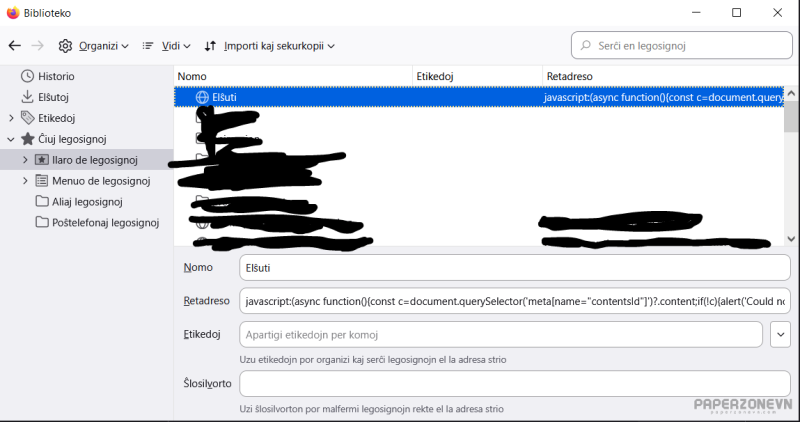
Tio estos nia elŝutbotono. Por aktivi ĝin ni nur navigos la oficialan paĝon de Kriejtiv-Parko, malfermos paĝo de modelo kiun ni ŝatas, kaj klikos la legosigno, ĉi tio aktivos la kodo kiu serĉos la PDF-dosiero kaj elŝutos ĝin a la komputilo!
Tie vi povos elŝuti iu ajn modelojn de Kanon-o. Mi esperas ke la informo estos tiel utila por vi, kiel ĝi estas por mi.
Se vi havas Reddito akonto ne forgesu iri a la fadeno kaj dankigi Cheddar_triffel kaj Nayeet uwu
||||||||||||||||||||||||||||||||||||||||||||||||||||||||||||||||||||||||||||||||||||||||||||||||||||||||||||||||||||||||||||||||||||||||||||||||||||||||||||||||||||||||||||||||||||||||||||||||||||||||||||||||||||||||||||||||||||||||||||||||||||||||||||||||||||||
[EN]
Context:
In case you don't know it, Canon Creative park is a webside from Canon in which they offer a lot of printable activities, like cardmaking, scrapbook parts and most importantly Papercraft models.
These models are really high quality, and include clear and illustrative instructions for each one.
Since the beginning of the site, all of the activities and models had been of free access and could be downloaded directly to any computer. Sadly from some time ago Canon had been deleting models from the site (although constantly adding new ones) and has been closing the access to the files: first they uploaded new models accessible only through a Canon ID account, until Septembee last year, for when they decided to limit the access to just the program Canon Print, which requiers a Canon printer to function
Since that change users learned how to access the files again by modifing the link with the Project ID number. This was patched by Canon just one month later.
But recently a Reddit user has managed to access the files with a line of code, apart from that I found an older version of the site archived in the Way Back Machine, where you can find a lot of models that have been since deleted from the Creative Park.
Method 1- Older Models:
The easier of the two: you have to enter the Creative Park website through the Way Back Machine, the link to insert is http: //c p.c-ij. com/en/contents/1006/ (delete the spaces) and then look for a capture in between late 2014 and early 2015, as these are the dates just before the site got updated. If you try to use a later date, or the current Creative Park link, you won't be able to navigate the site inside the Way Back Machine.
But, with the given link in these dates, you van go around the site and directly downlod the PDfs, including a lot of old models wich have been deleted from the site, like this checkered Soma Cube which is no longer in the Creative Park.
This is a slow way to navigate the site, i do not recomend to open more than two tabs at the same time.
Method 2: Newer Models (Post 2015):
I give credit of this method to the reddit users Cheddar_triffel, who created the method just when Canon limited the access, and Nayeet, who corrected the line of code once the website was patched. Here is the original thread.
For this methos we are going to create a fake bookmark, for which we will make one and edit it with any name (like for example, "download"), and instead of the ling we are going to paste this line of code (Please ingore the Emoticon, it is ": (" in the code):
javascript
This will be our download button, to execute it we will only need to navigate the oficial Canon Creative Park, open the page of the model we want, and then click our bookmark. This will run the code, which in turn will find the PDF and download it directly to our computer!
This way you will be able to once again download any model from the site. I hope this information is as usefull to you as it is to me.
If you have a Reddit account, do not forget to go to the original thread and thank Cheddar_triffel and Nayeet uwu
Sponsored: Google Advertising
Last edited:


